AI B-roll built into the edit.
ReadyForm finds supporting footage for the moments in your short video that ask for it, and places it on the right line, inside the edit, tied to the scene. Your brand kit's description of what you do steers what gets picked. Every choice is visible in the editor, and yours to replace or remove.
ReadyForm picks the visual. You decide whether it belongs. A relevant-looking clip can still be wrong for the claim it sits under.



What is an AI B-roll generator?
B-roll is supporting footage or imagery shown alongside the primary video to illustrate a point, add context or create visual variation. An AI B-roll generator uses the context of the video to prepare that media automatically.
ReadyForm reads the transcript of your edit, works out which lines would benefit from something to look at, searches for matching footage, and places it on that line for as long as the point takes. The words in your brand kit about what you do and who you talk to steer the search, so a video about running gets running, not stock handshakes.
It does not generate imagery from scratch, and it does not promise that a clip is factually right, on brand or cleared for your use. It finds a candidate and shows it to you.
Use visual media when it helps the viewer understand the point.
B-roll earns its place when it shows the thing being described, makes an abstract point concrete, or gives the eye a change while the argument continues. It costs the video something when it contradicts the words, is only decoration, changes too often, hides the speaker's expression or presents a staged scene as fact.
ReadyForm places B-roll sparingly, on the lines that ask for it, and never over the sentence that carries the point. The scene, the sentence, what came just before and how long the clip stays all decide whether a visual feels relevant, which is why it is reviewed inside the edit and not as a loose asset.
The best B-roll clarifies the message. It does not compete with it.
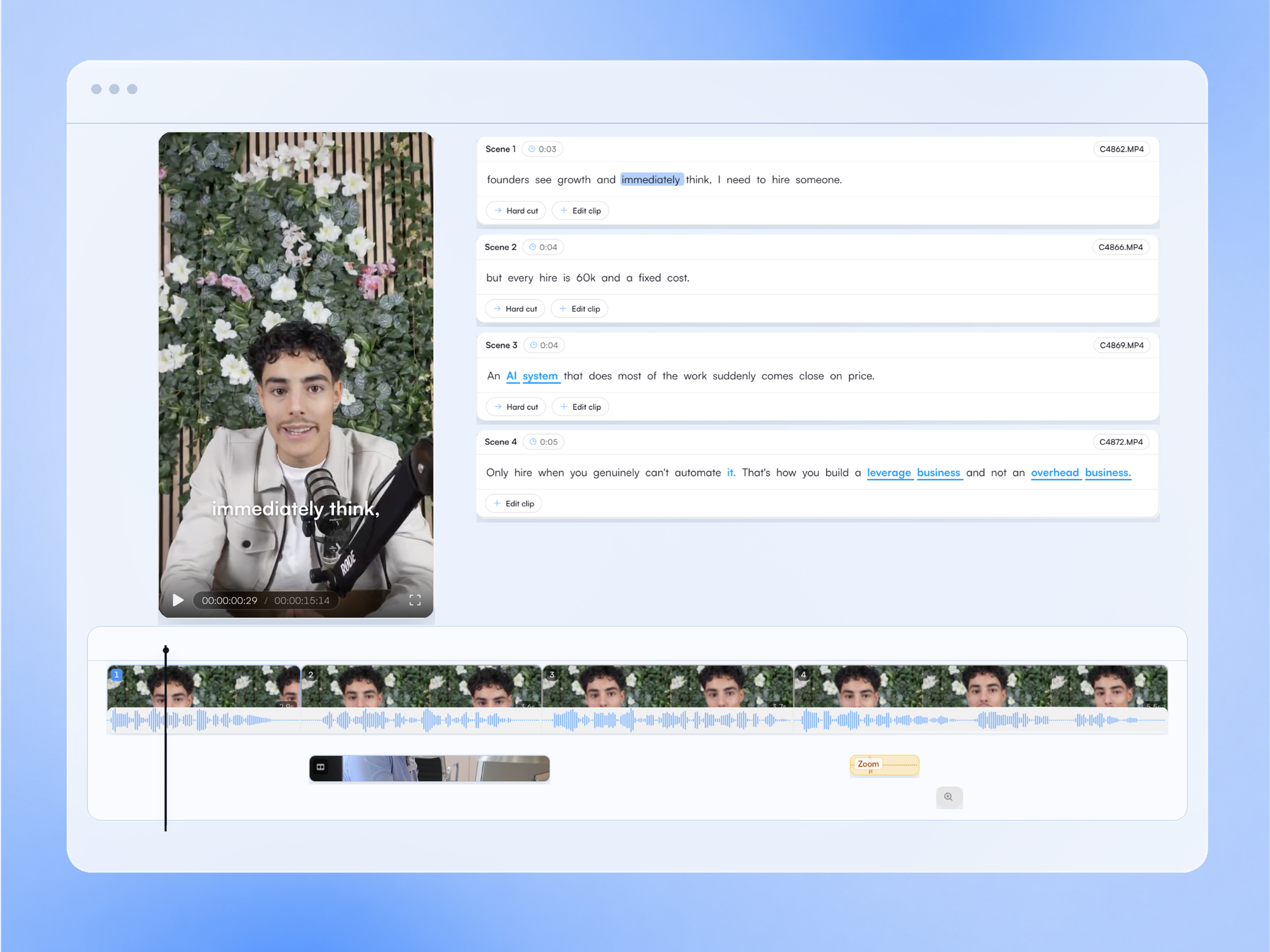
From a spoken line to a visual that earns its place.
Where B-roll enters the workflow, and where you do.
01
Upload the takes, pick a brand kit
Put the recordings for one short video into a project and choose the brand kit that belongs to it. That kit carries a short description of what you do, and that description is what decides whether a line about growth asks for a chart, a workshop or a product on a desk.
02
The edit is made
Before any visual is chosen, the edit itself is built: the takes are selected, the cuts are made and the captions are timed to the speech. That is the moment ReadyForm knows which sentence sits at which second, which is the only way a visual can land on the right line.
03
B-roll is found and placed
The lines that ask for a visual get one: matched to the words, on the scene, for as long as the point takes. Sound effects land on the cuts.
04
Look at each visual, then post
Does it match the words, represent the product or situation accurately, fit the tone, work vertically? Replace it from the picker, remove it, or add one elsewhere.
A relevant-looking visual can still be wrong.
What to check on every B-roll clip before you post. AI can find a candidate; it cannot take responsibility for the claim the visual communicates.
Factual accuracy
Does the clip show what the sentence says, or something that merely looks like it?
People and identities
Stock people are not your customers, your team or the person you are talking about. Do not let a cut imply they are.
Product representation
A product should look like the product. A generic interface under a claim about yours is a misrepresentation.
Location and culture
The setting should fit the audience and the claim.
Tone and brand fit
A serious point does not want a jokey clip; a personal brand does not want corporate stock.
Rights
You remain responsible for confirming that visual media may be used for your intended purpose.

Where B-roll strengthens the spoken content.
ReadyForm is built for talking-head videos, creator insights, educational content, product explanations, thought leadership, tutorials and founder content: videos where a person talks and a well-placed visual helps the viewer see the point.
It is not a stock library you browse, a cinematic footage marketplace, a text-to-video generator or a visual-effects suite, and it does not promise higher engagement or watch time. It puts the right kind of visual on the right line and lets you judge it.
Try it on your own footage for $0 today.
Every plan starts with 7 days free: 750 ReadyCredits, up to 3 standard videos, the complete editor, no watermark.
Start 7-day free trialQuestions before you upload?
How does ReadyForm generate B-roll?
It reads the transcript of the edit, finds the lines that would benefit from a visual, searches for matching footage steered by your brand kit's description, and places it on that line. It finds and places; it does not generate imagery from scratch.
Does ReadyForm place B-roll automatically?
Yes, on the scene and for the duration of the point. Every placement is visible in the editor.
Can I replace or remove the B-roll?
Yes. Open the scene, pick another clip from the picker, remove it, or add B-roll to a line that has none. The video re-renders.
Is AI-selected B-roll always accurate?
No. A clip can be irrelevant, misleading or wrong for the claim it sits under. Check every visual before you post.
Can I use my own footage as B-roll?
Yes. Media in your library can be placed on any scene, next to or instead of what ReadyForm found.
Does B-roll improve engagement?
It can add context and variation. ReadyForm does not promise watch time, engagement or conversion.
Can I try AI B-roll?
Yes. Every plan starts with 7 days free: 750 ReadyCredits for up to 3 standard videos, B-roll included. A payment method is required, $0 is charged today, and you can cancel anytime from your account.
Related: All features · Brand kits · AI video pacing · Talking-head video editing
See which moments ReadyForm gives a visual.
Upload the takes for one short video and judge every B-roll choice yourself.