AI video pacing for an edit that flows.
ReadyForm sets the rhythm of the finished video: how long each scene stays, where the cuts land, where a punch-in adds weight, how one idea hands over to the next. Cuts, captions, B-roll and sound are placed in one timeline, so the pacing can be judged as a whole.
ReadyForm sets the flow. You decide whether it feels right. Pacing is not playback speed: nothing is sped up.

What is video pacing?
Video pacing is the rhythm created by scene duration, cuts, speech, pauses, captions, visual media and transitions throughout an edit.
It is not the same as speed. Playback speed changes how quickly footage plays; pacing is how the content is structured and how long each part stays. A thirty-second video can feel rushed or feel slow at exactly the same speed, depending on where the cuts fall and how much room each idea gets.
ReadyForm sets the initial pacing when it makes the edit: scene lengths from the sentences, cut points at their boundaries, punch-ins on the moments that carry weight, transitions between ideas, captions timed to the words, B-roll for as long as a point takes. It does not speed anything up, and it does not promise retention or completion rates.
Every editing decision affects how the video feels.
How long the opening takes. How quickly the main point arrives. The cuts between takes. The pauses between ideas. The length of each scene. How long a caption is on screen. When the B-roll comes and goes. How complex the explanation is. How the ending lands.
Because ReadyForm makes all of that in one pass, the pacing can be reviewed in context: the whole video, from opening to ending, rather than a list of separate settings.
Good pacing gives each idea the time it needs, without keeping unnecessary footage.
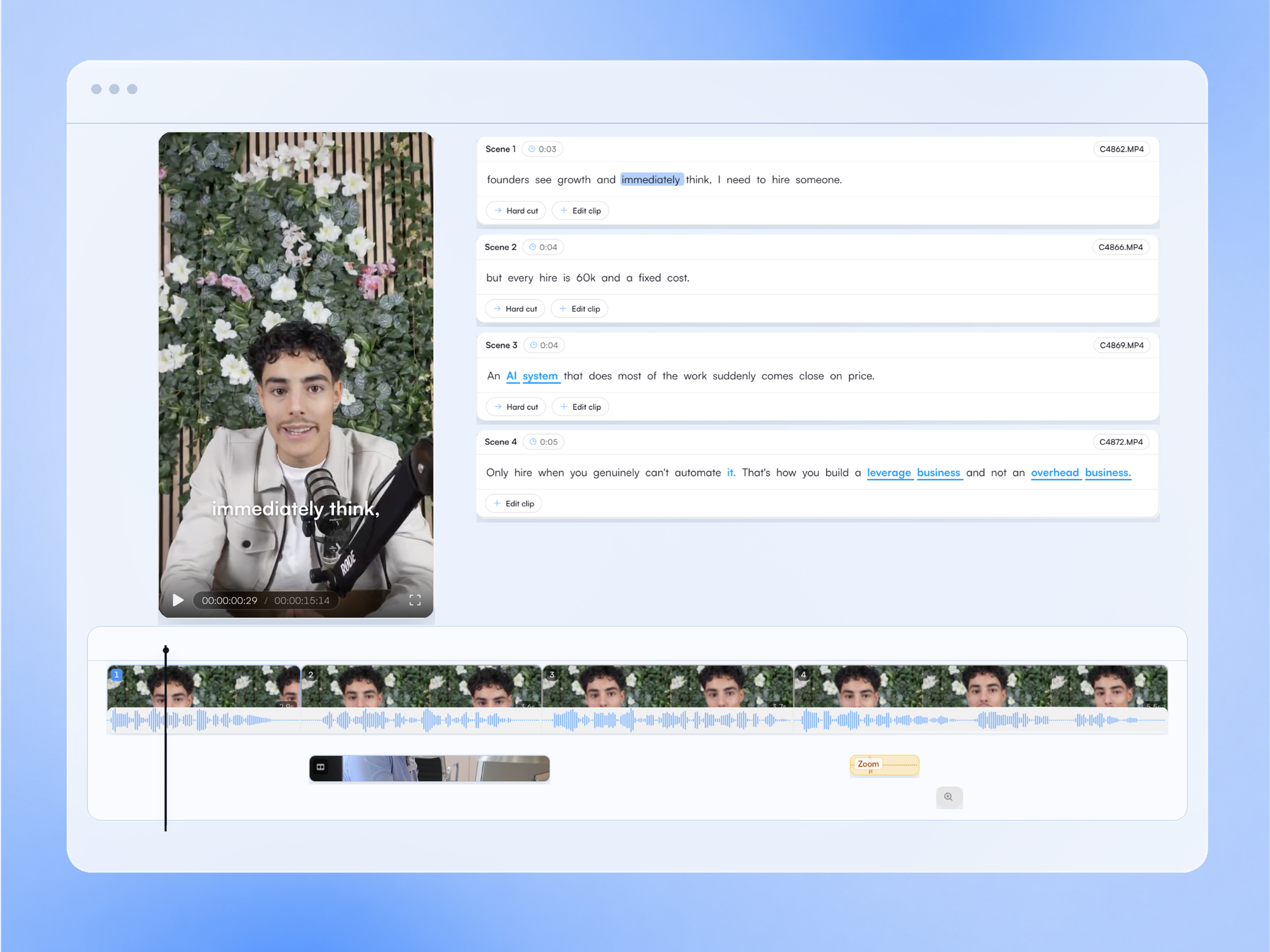
What sets the rhythm, and what you can change.
The elements ReadyForm arranges in one timeline. Each is visible there and yours to adjust.
Scene duration
How long the opening, the explanation, the example and the ending stay. Follows the sentences; cut or extend a scene to change it.
Cuts and transitions
Where the video moves from one take or thought to the next, and how: hard cut or transition.
Zooms
Punch-ins on the moments that carry weight. Add one, remove one, move one.
Pauses
Some can go; some give emphasis or let a complex point land. Restore a pause the cleanup took if the video needs it.
Caption reading time
Words per caption and display time decide how fast a viewer can process. Set in the brand kit.
B-roll and sound
Too many visuals, or too short, make the rhythm restless. Sound effects on the cuts mark the beats.
Give important moments enough room.
Short-form video does not have to feel hurried. A technical explanation, an emotional point or an important qualification may need more time than a hook, a transition, a repeated sentence or a visual that adds nothing. ReadyForm removes unnecessary delay; whether a moment deserves more time than it got is your call, and the timeline is where you give it.
ReadyForm is built for talking-head, educational, expert and product videos. It is not a playback-speed changer, a slow-motion editor, an audience-retention predictor or a guarantee of social performance. Faster is not automatically better, and no editor can promise that people keep watching.
Try it on your own footage for $0 today.
Every plan starts with 7 days free: 750 ReadyCredits, up to 3 standard videos, the complete editor, no watermark.
Start 7-day free trialQuestions before you upload?
What is pacing in video editing?
The rhythm created by the duration and order of scenes, cuts, speech, pauses, captions, visual media and transitions. Not the playback speed.
How does ReadyForm help with video pacing?
It sets scene lengths, cut points, zooms, transitions, caption timing and B-roll duration in one pass and shows them in one timeline, so you judge the rhythm of the whole video and change what you want.
Does ReadyForm automatically optimise pacing?
It sets a good initial rhythm from the sentences and the structure. It does not claim to make every video perfectly paced, and it does not use retention data.
Can I change scene duration and zooms?
Yes. Cut or extend a scene, add or remove a zoom, move a cut, restore a pause. The video re-renders.
Does faster pacing improve engagement?
Not automatically. Some points need room. ReadyForm does not promise engagement, retention, views or completion rates.
Can I try ReadyForm's pacing?
Yes. Every plan starts with 7 days free: 750 ReadyCredits for up to 3 standard videos. A payment method is required, $0 is charged today, and you can cancel anytime from your account.
Related: All features · Automatic video cuts · Automatic video captions · Short-form video editor
See how your footage moves as one edit.
Upload the takes for one short video and judge the rhythm yourself.